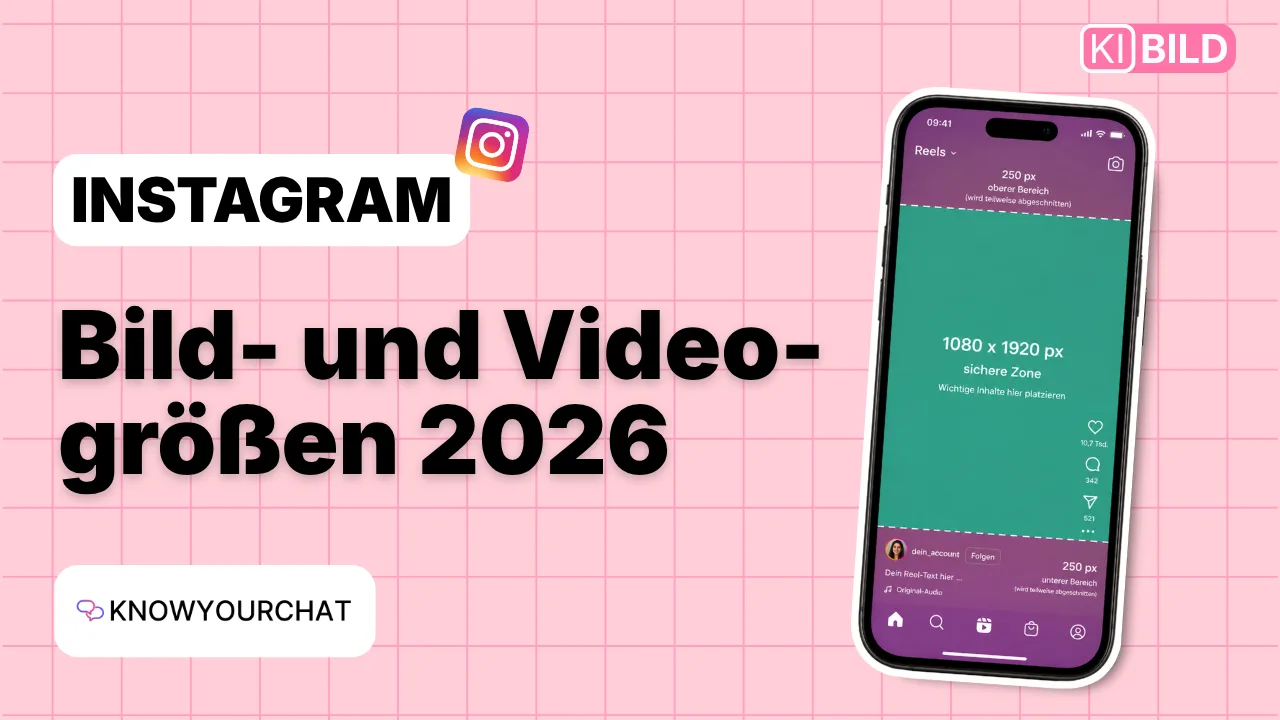

Facts first: In 2026, there is no single correct image size for Instagram. Feed posts and carousels can be created in portrait format at 1080 × 1440 pixels (3:4), while Reels and Stories are created at 1080 × 1920 pixels (9:16) for full-screen display. You should also keep safe zones in mind so that text, logos and other important elements aren't covered by the Instagram interface or awkwardly cropped in the preview. The classic 1080 × 1080 pixel square still works, but it's no longer the best choice for every type of content.
Instagram has become significantly more vertical in recent years. This applies to Reels and Stories as well as classic posts and the profile grid.
That's why businesses and creators keep asking the same question: Which Instagram image size should I actually use?
The answer depends on how you want to publish your content.
Instagram image sizes 2026 at a glance
Here's an easy way to remember the most important formats:
Instagram formatSizeAspect ratio
Portrait feed post
1080 × 1440 px
3:4
Portrait feed post, alternative
1080 × 1350 px
4:5
Square post
1080 × 1080 px
1:1
Carousel
1080 × 1440 px
3:4
Reel
1080 × 1920 px
9:16
Story
1080 × 1920 px
9:16
The 3:4 format deserves special attention. Instagram introduced native support for 3:4 photos in 2025. This matters because many smartphone cameras capture photos in this aspect ratio anyway, so Instagram can now display them without cropping them first.
What size should Instagram posts be?
For a long time, the square was the quintessential Instagram format:
1080 × 1080 pixels, aspect ratio 1:1.
You can still publish square posts. However, if you create new graphics and photos specifically for Instagram today, you can make better use of the available space.
An interesting size is therefore:
1080 × 1440 pixels in a 3:4 aspect ratio.
The format uses more vertical space and also matches how the Instagram profile grid is displayed today. Instagram now supports 3:4 natively for photos.
The long-established portrait format of 1080 × 1350 pixels (4:5) also still works. So you don't have to replace your existing templates right away.
For new designs in 2026, however, we would at least test 3:4 and take it into account in your layouts.
The right size for Instagram carousels
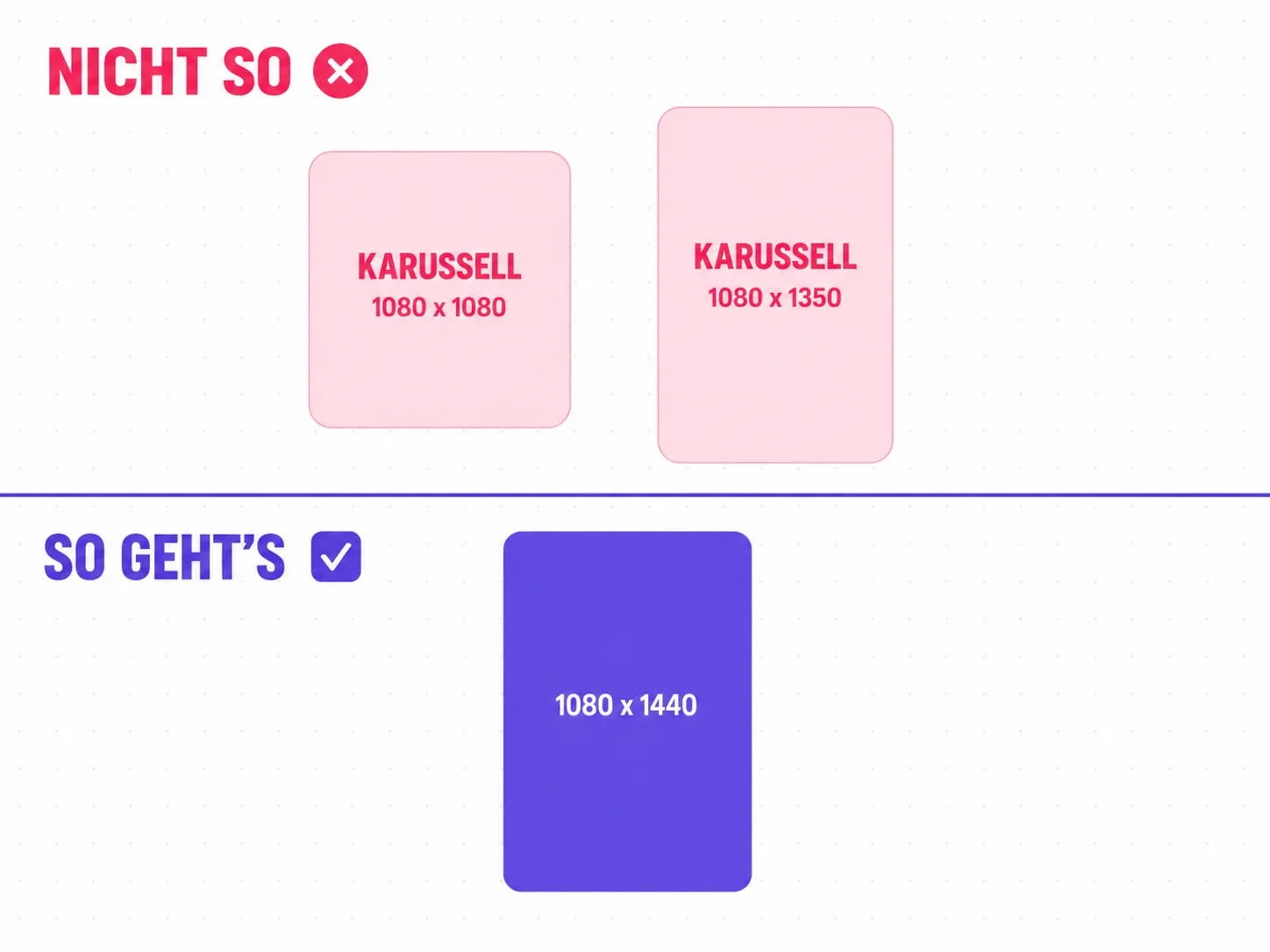
Portrait format is worth it for carousels too.
Instead of creating individual slides at 1080 × 1080 pixels by default, you can use significantly more screen space with 1080 × 1440 pixels.
This is especially handy for explanatory carousels. Headlines, images, graphics and short text passages get more room without overloading the individual slides.
Consistency is important, though.
All slides of a carousel should be designed for the same aspect ratio from the start. Also, important headlines, logos and other elements shouldn't sit right at the edge.
This applies especially to the cover. It has to work both in the post itself and in the preview on your profile.
Why the Instagram profile grid matters
This is one of the biggest changes compared to the Instagram of the past.
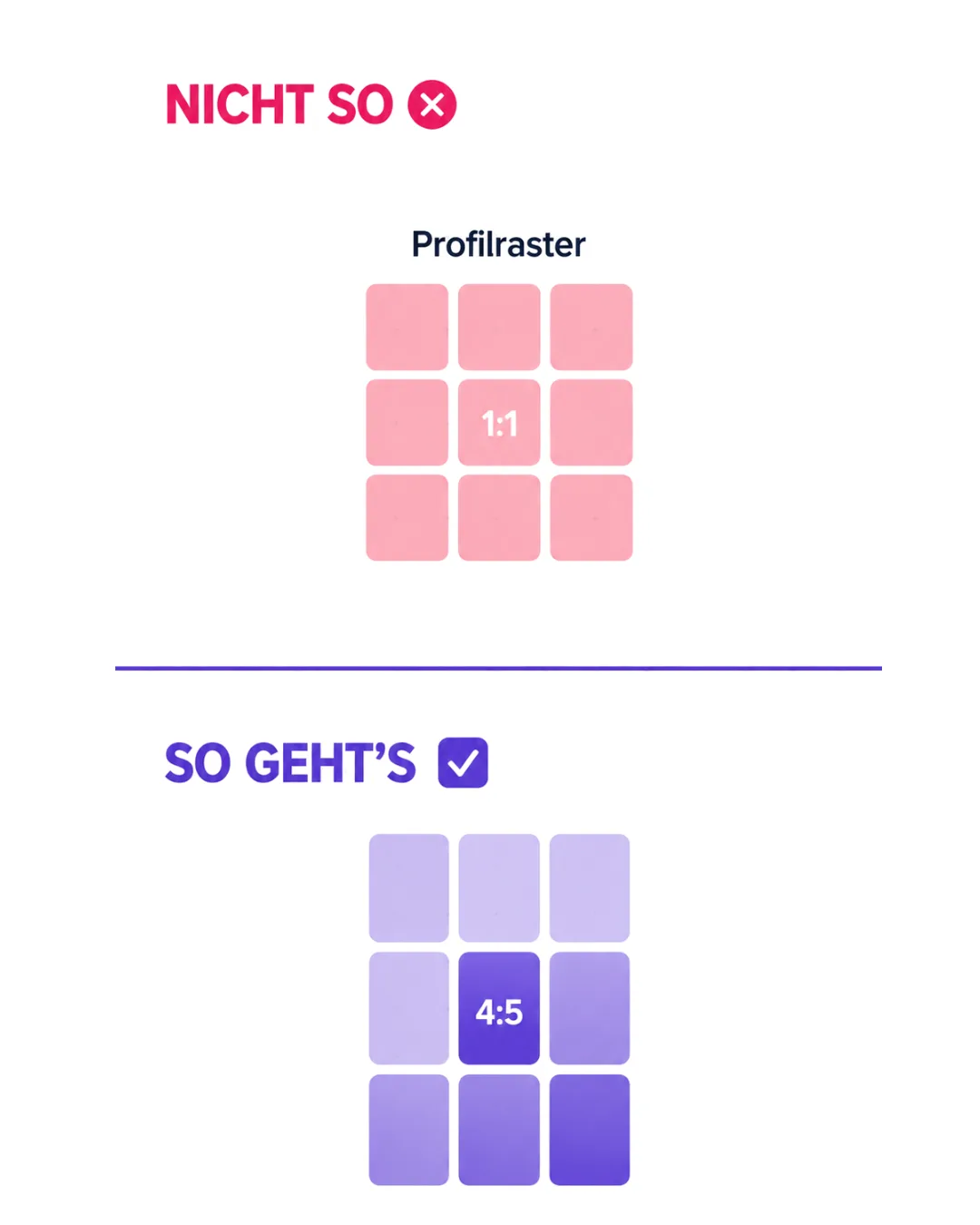
For many years, the profile grid was square. Instagram then switched to a vertical display. Profile thumbnails are currently shown in a 3:4 ratio. As a result, an opened post can look different from its preview on the profile.
That's exactly why you should distinguish between three things:
Upload size, how the post is displayed and the preview in the profile grid.
For example, a 4:5 post at 1080 × 1350 pixels can be displayed in full as a post, while its preview in the 3:4 profile grid is slightly cropped.
For your design, this means: don't place faces, headlines and logos too close to the outer edges.
What size are Instagram Reels?
For Reels, the recommendation is much simpler:
1080 × 1920 pixels in a 9:16 aspect ratio.
This format matches the vertical smartphone display and uses the available space completely. Instagram does accept other aspect ratios for Reels, but 9:16 is the obvious production format for full-screen vertical display. Instagram also specifies a minimum resolution of 720 pixels and at least 30 frames per second for Reels.
However, there is a crucial difference between file size and the design area you can actually use.
Instagram overlays various elements on a Reel, such as account information, the caption and controls.
Text placed at the very bottom of a 1080 × 1920 pixel video may be part of the video but still be hard to read.
The safe zone for Instagram Reels
That's exactly why so-called safe zones make sense.
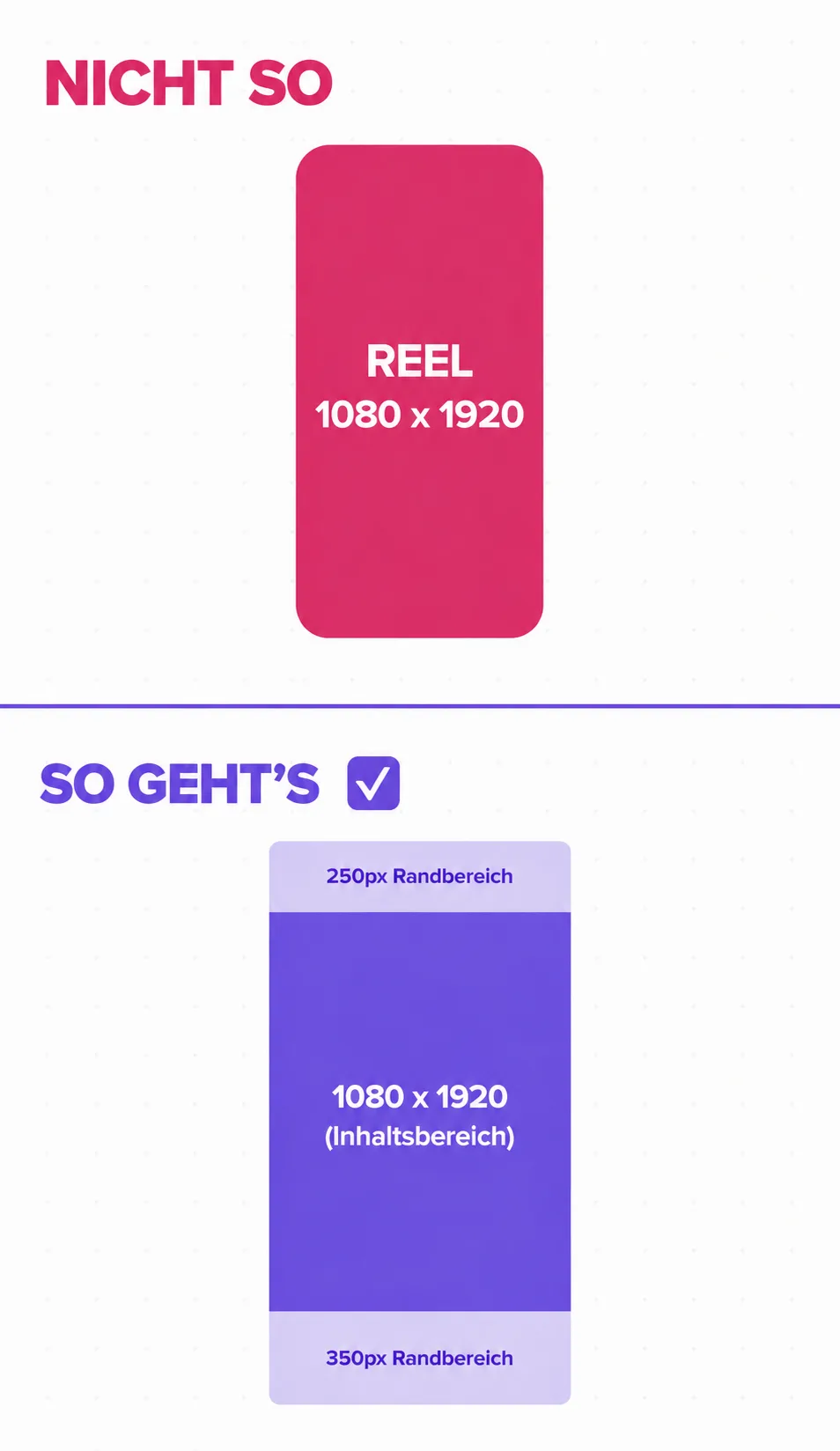
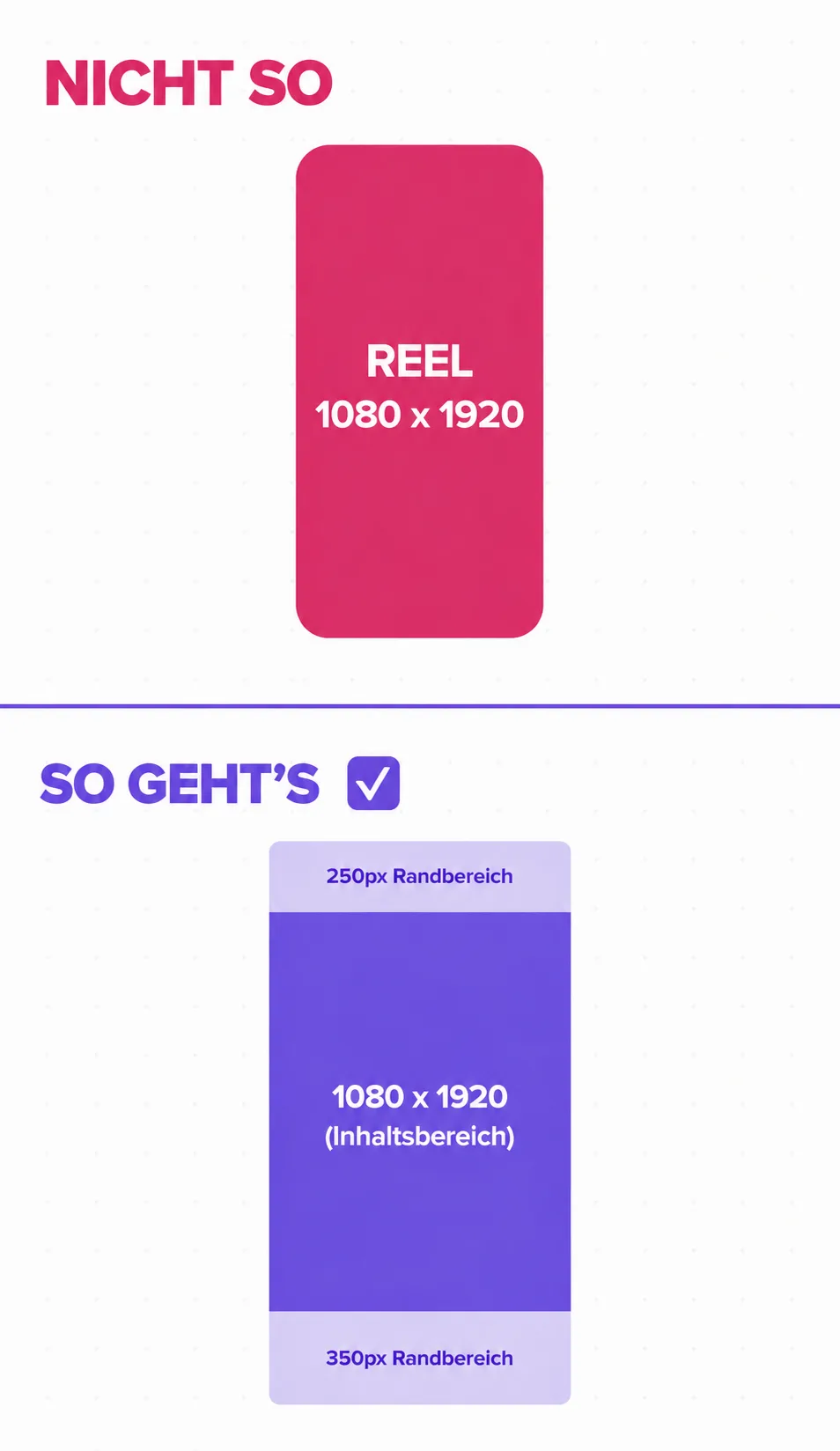
As a practical design rule, roughly 250 pixels of space at the top and a larger safety area at the bottom are often planned in. The illustration, for example, uses 250 pixels at the top and 350 pixels at the bottom.
However, you should treat these values as design guidelines and not as fixed technical Instagram specifications. The interface can change, and different elements can be displayed depending on the usage situation.
The more important rule is therefore:
Text, faces, logos and other key information belong in the center of the video, not right at the edge.
That way, your Reel stays understandable even when Instagram overlays additional controls.
What size are Instagram Stories?
The same applies to Instagram Stories:
1080 × 1920 pixels, aspect ratio 9:16.
The portrait format fills the smartphone screen and is therefore the most sensible starting size for photos, videos and designed Story slides.
Here, too, you shouldn't fill the entire area with important information.
At the top, you'll find profile information and the progress bar, among other things. At the bottom, interactive elements may be displayed.
A commonly used guideline in practice is therefore to keep roughly 250 pixels free at the top and bottom. This leaves a large area in the middle for headlines, images and other important elements. This value, too, is a design rule and not a permanently guaranteed Instagram limit.
Why the right Instagram size matters in the first place
First of all, the correct dimensions prevent very practical problems.
Text isn't cut off unnecessarily. Logos stay visible. A Reel makes full use of the smartphone screen, and a carousel doesn't have to be recropped afterwards.
But the format also influences how much visual attention a post can claim.
A vertical feed post takes up more space on a smartphone than a small square image. With Reels and Stories, this effect is even more pronounced: 9:16 is designed for vertical use of the display.
That doesn't mean every square post is suddenly wrong.
Instagram still supports various aspect ratios. What matters is choosing the format deliberately when you create your content.
Format first, then content
In content production in particular, it's worth defining the technical basics early on.
If a carousel is first designed in 1:1 and later transferred to a vertical format, text, images and spacing often have to be rearranged. The same goes for videos that are first produced horizontally and then somehow squeezed into a Reel.
The reverse order works better:
Choose the channel → define the format → develop the content for it.
For a Reel, for example, the Mates from Matelify can help you turn an idea into a video script. For an Instagram post or carousel, topics, structure and caption can be prepared.
This way, format and content are considered together from the start.
After all, the right pixels alone don't make a good Instagram post. But they do create the framework for one.
Instagram image sizes: frequently asked questions
Which image size is best for Instagram in 2026?
For vertical feed photos and content designed accordingly, 1080 × 1440 pixels (3:4) is an interesting current size. Instagram supports 3:4 photos natively, and the format fits the platform's vertical evolution. 1080 × 1350 pixels (4:5) and 1080 × 1080 pixels (1:1) still work.
What size should an Instagram carousel be?
For new vertical carousels, you can use 1080 × 1440 pixels (3:4). It's important to design all slides consistently and to place key elements with enough distance from the edge.
What size are Instagram Reels?
For Reels, 1080 × 1920 pixels in a 9:16 aspect ratio is recommended. This way, the video makes full use of the vertical smartphone screen.
What size are Instagram Stories?
Stories are also ideally created at 1080 × 1920 pixels in a 9:16 ratio. Important elements shouldn't be placed directly at the top or bottom edge.
What is an Instagram safe zone?
A safe zone is the area in which important content is least likely to be affected by controls or cropping. The commonly cited pixel margins are practical design guidelines and may change as the Instagram interface changes.
Creating social media content with Matelify
The right Instagram formats are the foundation; the right content turns them into a great post. With Matelify, you can organize your social media work in one place and let the Mates support you with ideas, captions or scripts for Reels, taking your brand, target audience and tone of voice into account. Sign up for Matelify for free now.